
vSphere Supervisor Architecture:
Before discussing vSphere Supervisor architecture with NSX VPC based networking, it is important to understand vSphere Supervisor related concepts.
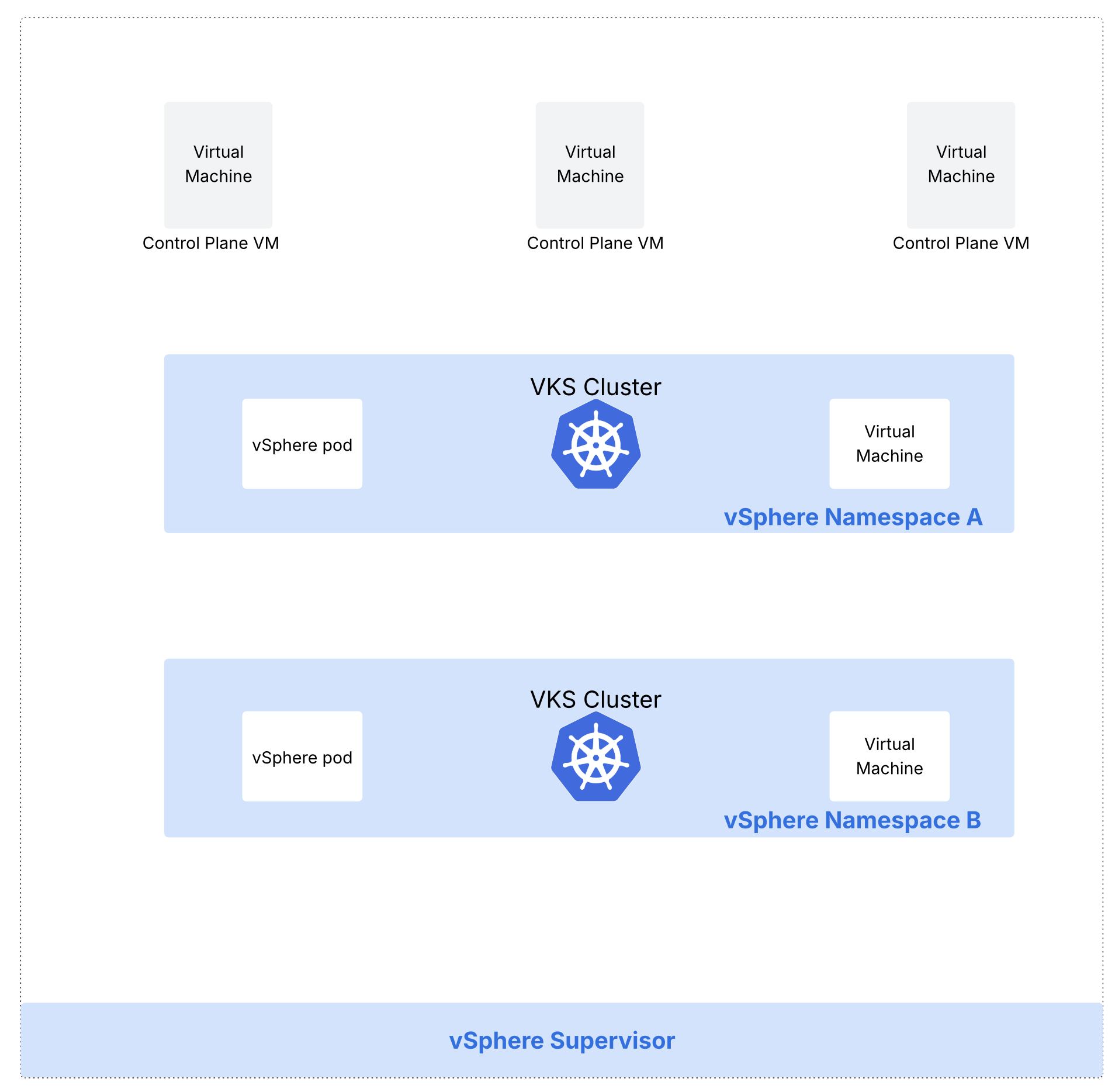
What is a vSphere Supervisor?
When activated on vSphere clusters, vSphere Supervisor provides the capability to run workloads (such as VKS clusters, vSphere pods, virtual machines) in vSphere in declarative fashion.
It enables a declarative API in vSphere and deploys Kubernetes control plane directly on vSphere clusters.
Supervisor control plane VMs:
When you activate a Supervisor, a Kubernetes control plane is created. vSphere Supervisor provides a declarative API and desired state by deploying a Kubernetes control plane directly on vSphere clusters. This control plane enables the capability to run workloads (such as VKS clusters, vSphere pods, virtual machines) in a declarative fashion on vSphere clusters.
What is a vSphere namespace?
The resource boundaries where workloads such as VKS clusters, vSphere pods and virtual machines run in a vSphere Supervisor are called vSphere Namespaces. As a vSphere admin, vSphere namespaces are configured with specified amount of CPU, memory and storage. Once configured, they are then provided to DevOps engineers.
What is vSphere Kubernetes Service VKS?
vSphere Kubernetes service is used to deploy upstream Kubernetes clusters on vSphere Supervisor. You are able to reduce the amount of time and effort that you typically spend for deploying and running an enterprise-grade Kubernetes cluster.
What is a VKS cluster?
Kubernetes clusters deployed by the vSphere Supervisor service are also called VKS clusters; built, signed, and supported by VMware by Broadcom. A VKS cluster is defined in the vSphere Namespace using a custom resource. A VKS cluster is integrated with vSphere SDDC stack including networking and storage. You can use kubectl commands and the VCF cli in order to provision VKS clusters.
Networking options for vSphere Supervisor are:
- VMware NSX with VPC (Recommended) – More on this below and this is covered in this blog.
- VMware NSX
- VDS
What is a vSphere pod?
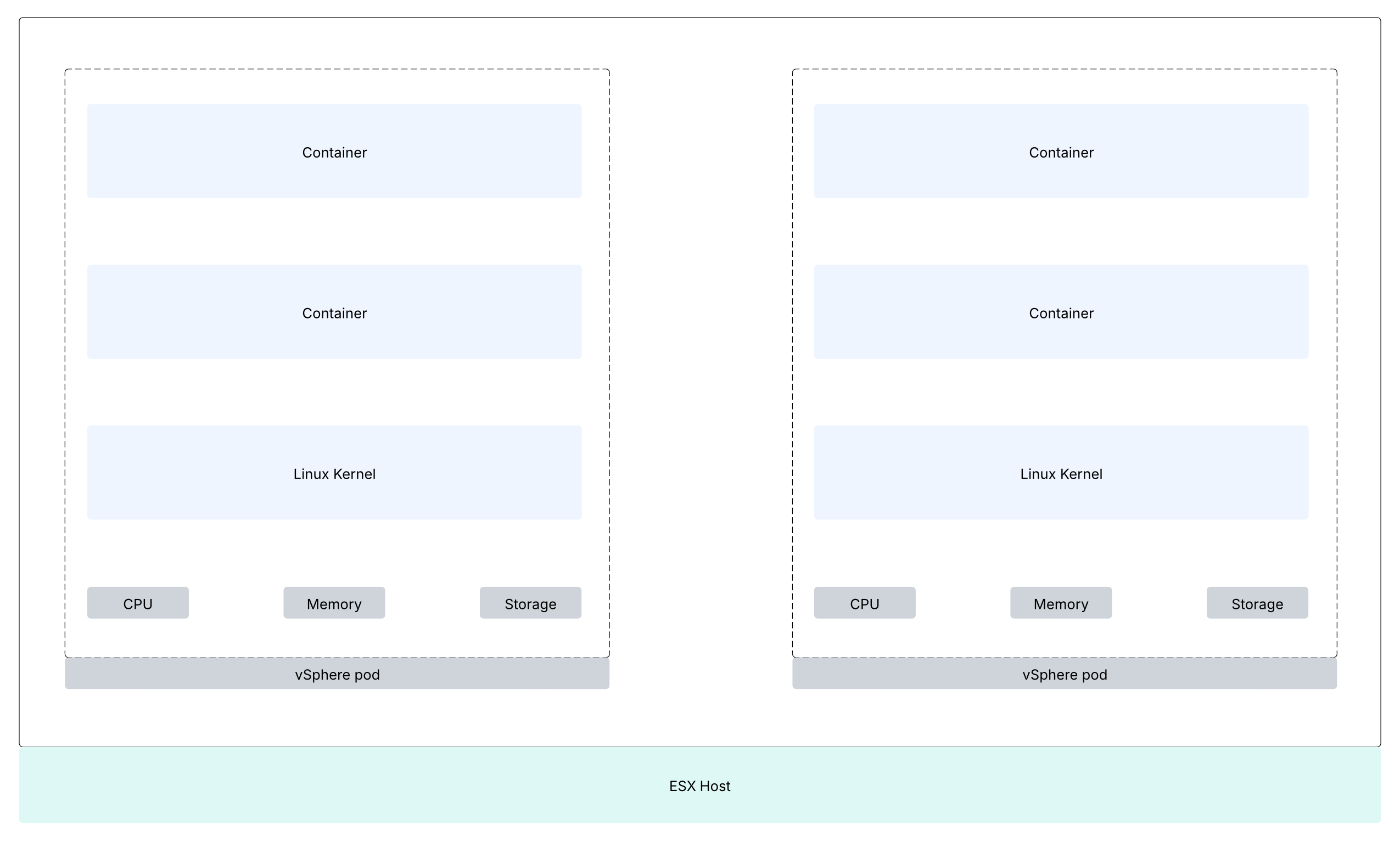
This construct is the equivalent of Kubernetes pod. A vSphere Pod is a VM with a small footprint that runs one or more Linux containers. Each vSphere Pod has its own unique Linux kernel. A vSphere Pod is isolated in the same manner as a virtual machine. vSphere Pods are only supported with Supervisors that are configured with NSX as the networking stack.
vSphere Zones:
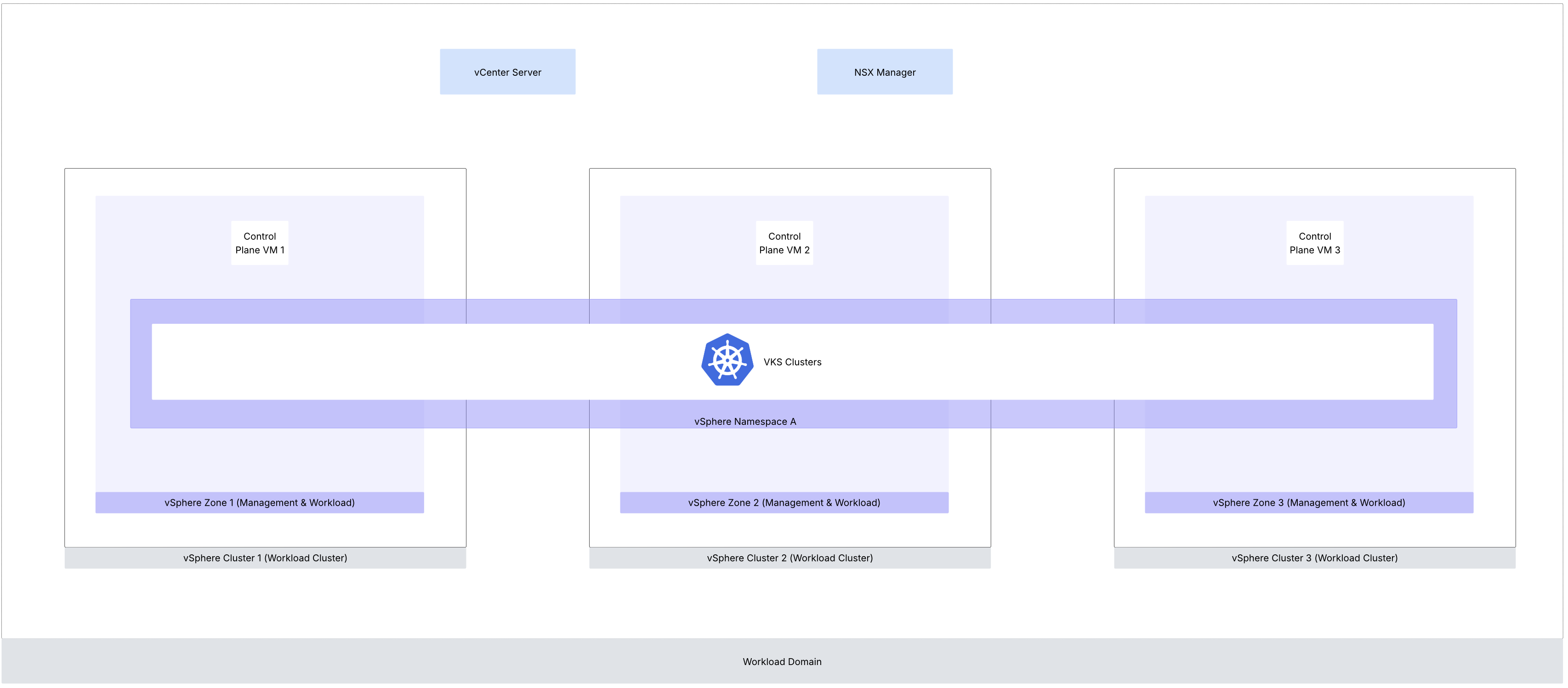
vSphere Zones provide high-availability against cluster-level failure to workloads deployed on vSphere Supervisor. A vSphere zone is mapped to a vSphere cluster. For separation between the workload and management planes, you can use the vSphere Zones where the Supervisor runs for the management plane only and assign different vSphere Zones to vSphere Namespaces. You can add up to three vSphere Zone to a vSphere Namespace.
NSX VPC concepts:
It is important to understand NSX VPC related concepts before understanding vSphere supervisor with NSX VPC networking.
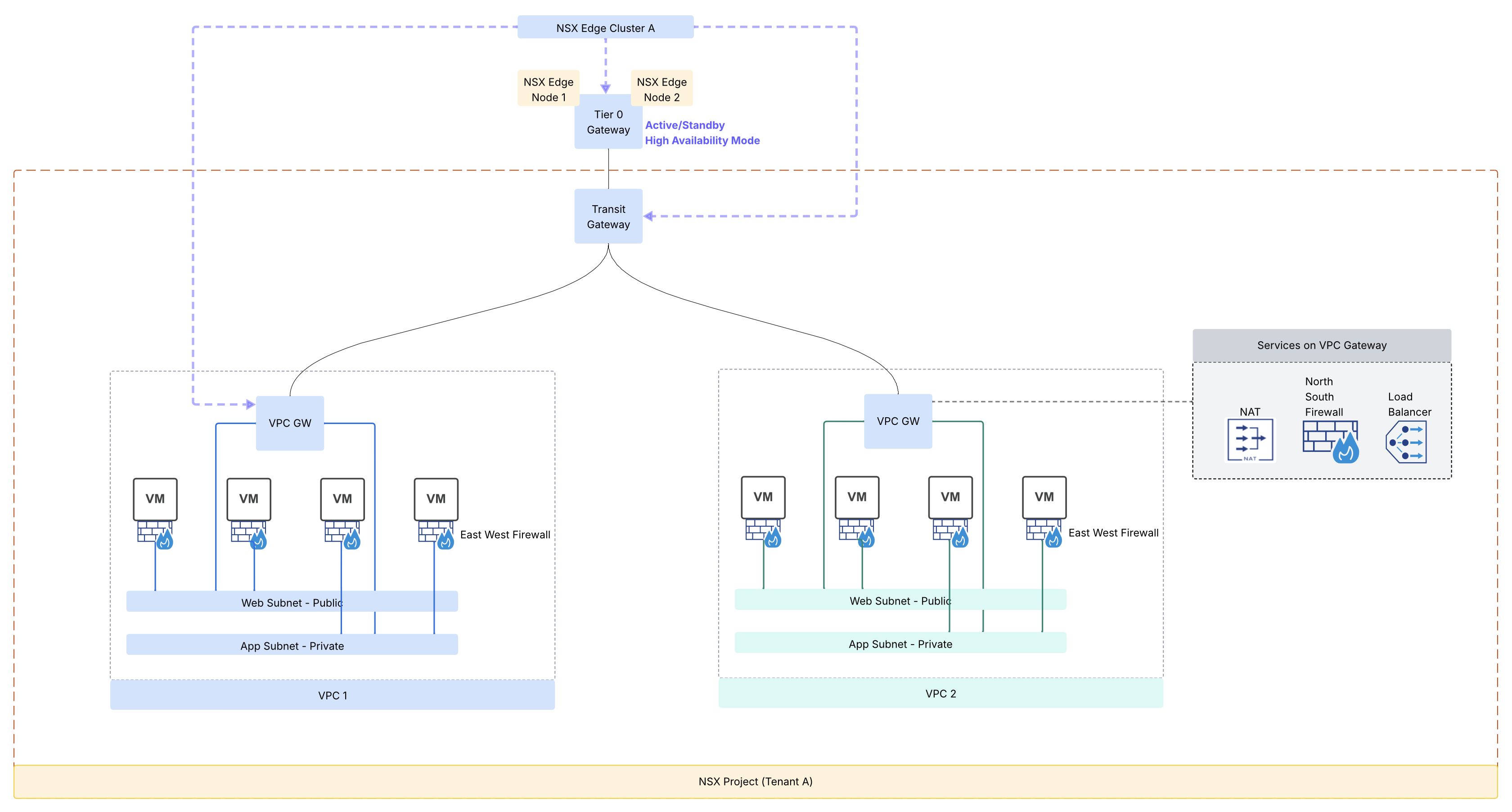
- NSX project feature brought multi-tenancy capability to NSX whereby it was no longer needed to deploy a dedicated NSX manager instance for each tenant for their networking and security requirements. Multiple NSX projects can be configured using the same NSX manager and each NSX project can individually map to corresponding tenant. NSX projects serve as the foundation for tenant isolation. Each NSX project has its own independent configurations, alarms and labeled logs. NSX users across tenants can access the same NSX Manager to provision networking and security objects specific to their tenant only, on shared hosts
- NSX VPC brings additional multi-tenancy capabilities to VMware NSX. This is tenancy within a tenant whereby a tenant could have multiple lines of business with each line of business requiring further isolation. Now one can create multiple VPCs within NSX project. After adding a NSX VPC in your NSX project, you can assign roles to users in the NSX VPC. These users can then start configuring networking or security objects as required for the workloads, which are running inside their NSX VPC.
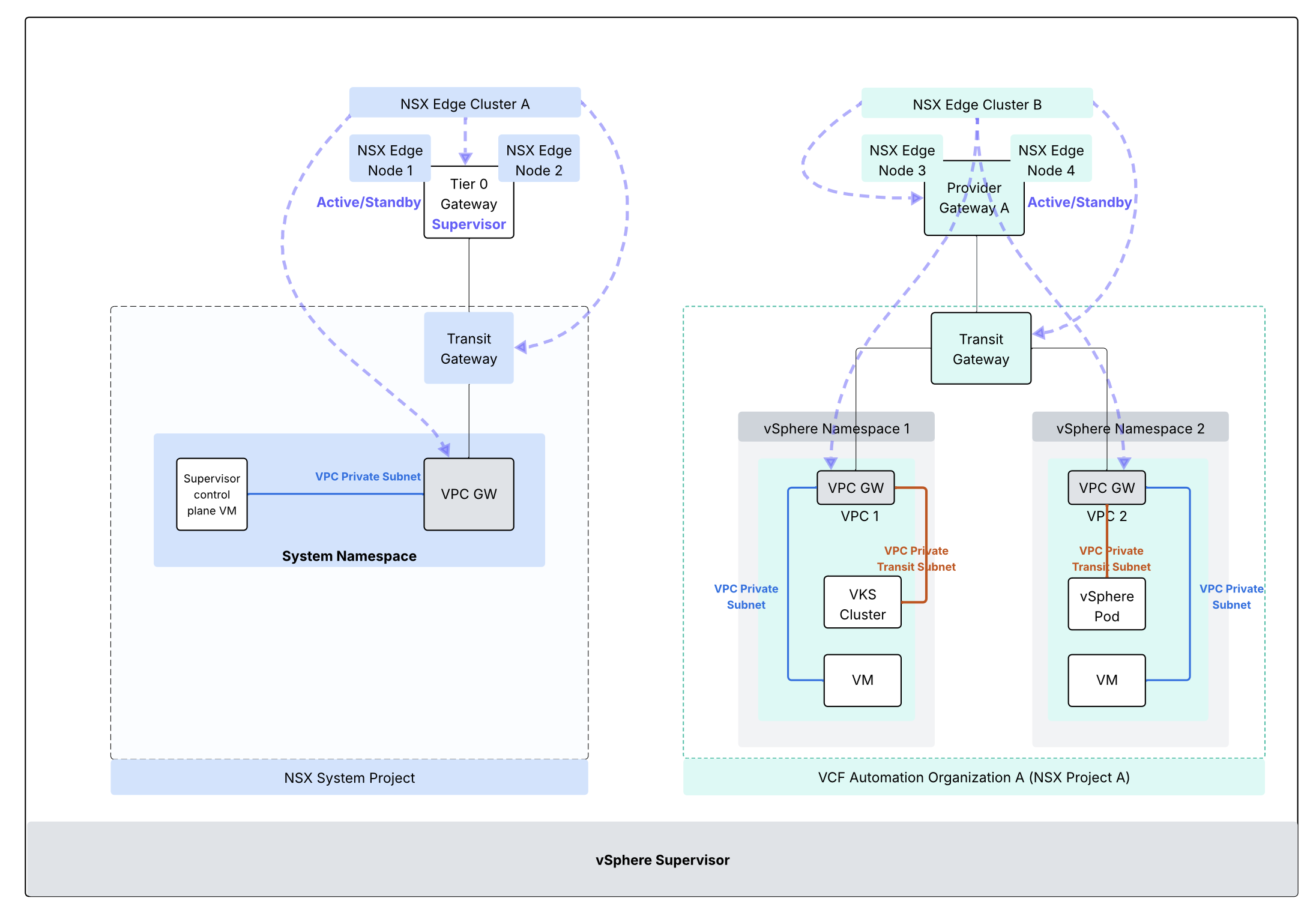
- Transit Gateway: Each NSX project has only one transit gateway interconnecting the NSX VPCs provisioned in that NSX project. This gateway provides inter VPC communication within the particular NSX project. The transit gateway also provides connectivity externally using centralized transit gateway (using Tier 0 Gateway) or using a distributed transit gateway (does not require NSX edge deployment). Centralized transit gateway relies upon upstream Tier 0 Gateway to connect to the physical network whereas a distributed transit gateway connects directly to the physical network using VLAN. In case of centralized transit gateway, the SR component of the TGW is collocated on the same edge nodes as the associated Tier-0 Gateway or VRF gateway. Note that in case of a Centralized connection, the Transit Gateway will inherit its HA Mode (Active/Standby or Active/Active) from the Tier-0 gateway to which it is connected.
- VPC gateway: Each VPC has a implicit VPC gateway providing inter subnet communication within the VPC itself. On the upstream side, VPC gateway is connected to transit gateway. Connectivity between workloads in the same VPC is available unless East-West firewall (DFW) is configured. For the VPC gateway, it is permissible to use a separate NSX edge cluster which is separate from NSX edge cluster used for Tier 0 GW / Transit Gateway. A VPC includes subnets (NSX logical networks) and these subnets could be of the type as follows:
- Private VPC: Local to VPC itself, requires NAT on the VPC gateway to be accessible outside of VPC
- Private Transit Gateway: Specific to the NSX project, requires NAT on the transit gateway to be accessible from external physical network.
- Public: This subnet type is reachable from other networks without any NAT requirement.
Supervisor Architecture for system namespace with NSX VPC:
The architecture below is for vSphere Supervisor System Namespace with NSX VPC based networking.
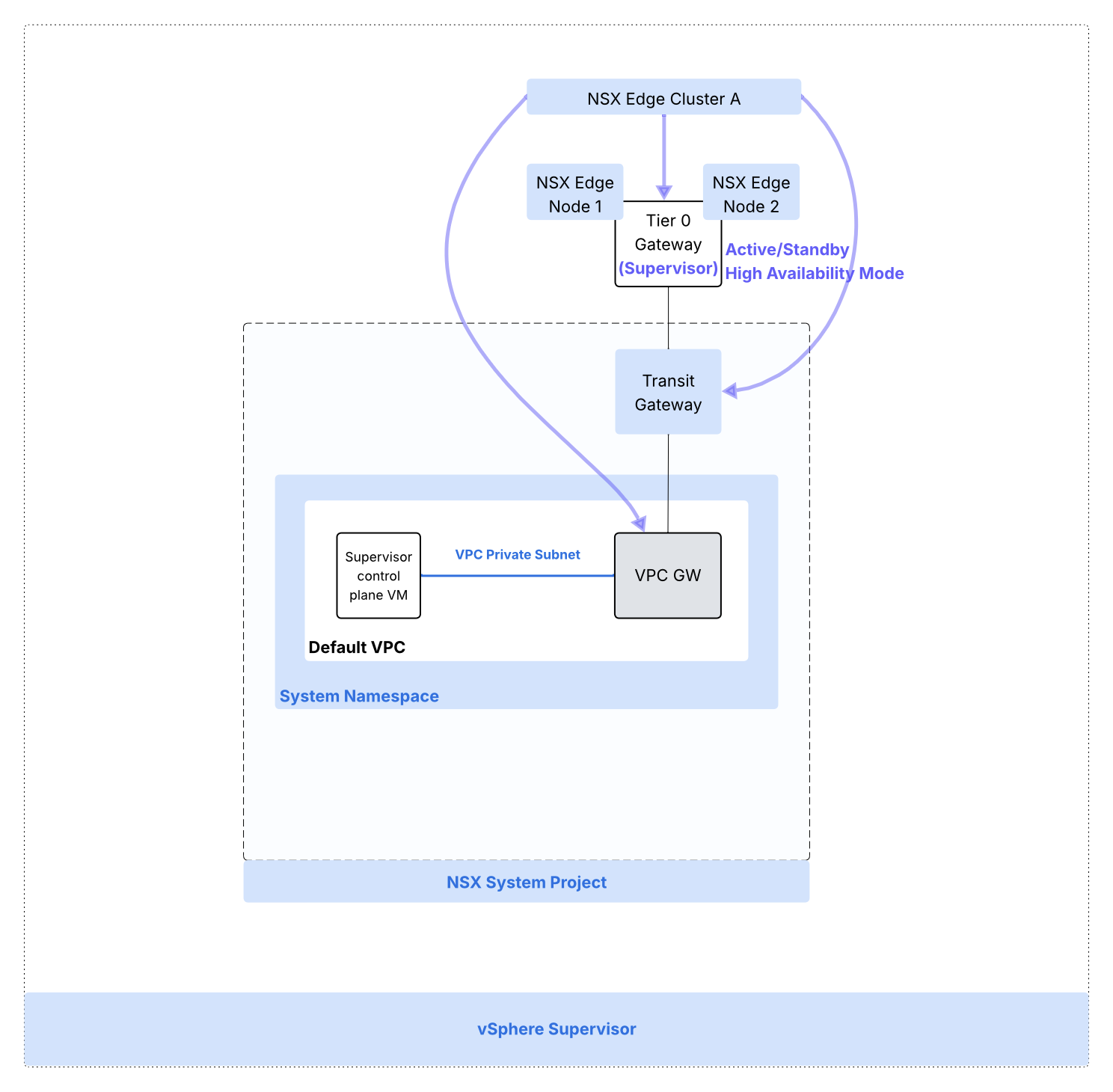
Prerequisites for deploying vSphere Supervisor with NSX VPC:
- DNS servers
- NTP servers
- vSphere Zone: To activate a Supervisor, you must create at least one vSphere Zone that will act as the Management Zone of the Supervisor.
- NSX Edge Cluster
- Tier 0 Gateway configured in Active/Standby High Availability Mode.
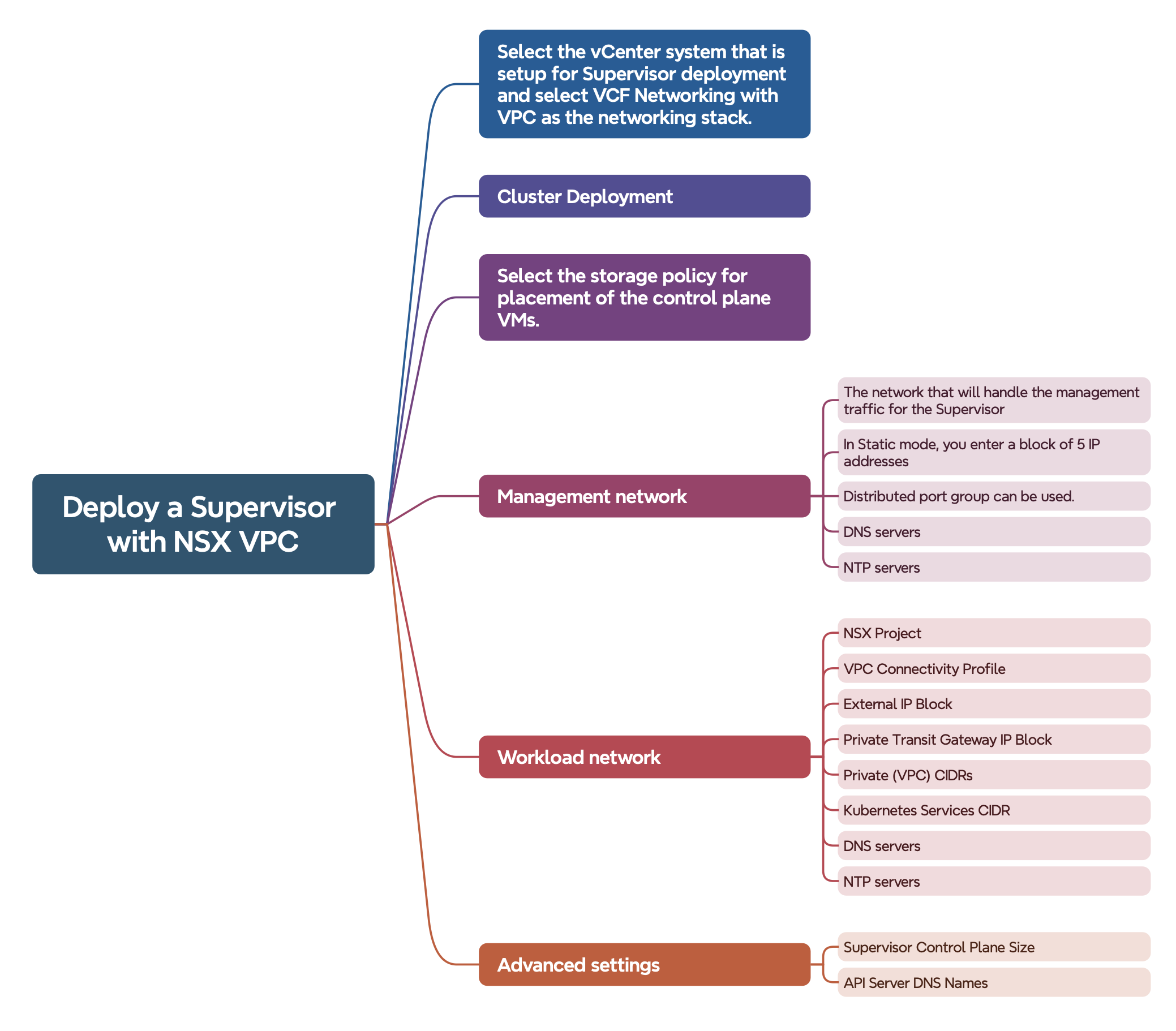
- Storage policy: This storage policy is used by supervisor and namespaces. The policies represent datastores and manage storage placement of such components and objects as Supervisor control plane VMs, vSphere Pod ephemeral disks, and container images. You might also need policies for storage placement of persistent volumes and VM content libraries. If you use VKS clusters, the storage policies also dictate how the VKS cluster nodes are deployed.
- Management network: This network will be used for Supervisor Control Plane VMs. This network can be backed by a distributed port group on the VDS. A block of 5 IP addresses is needed.
- Workload network, NSX VPC related requirements
- Centralized Transit Gateway
- Workload network requirements
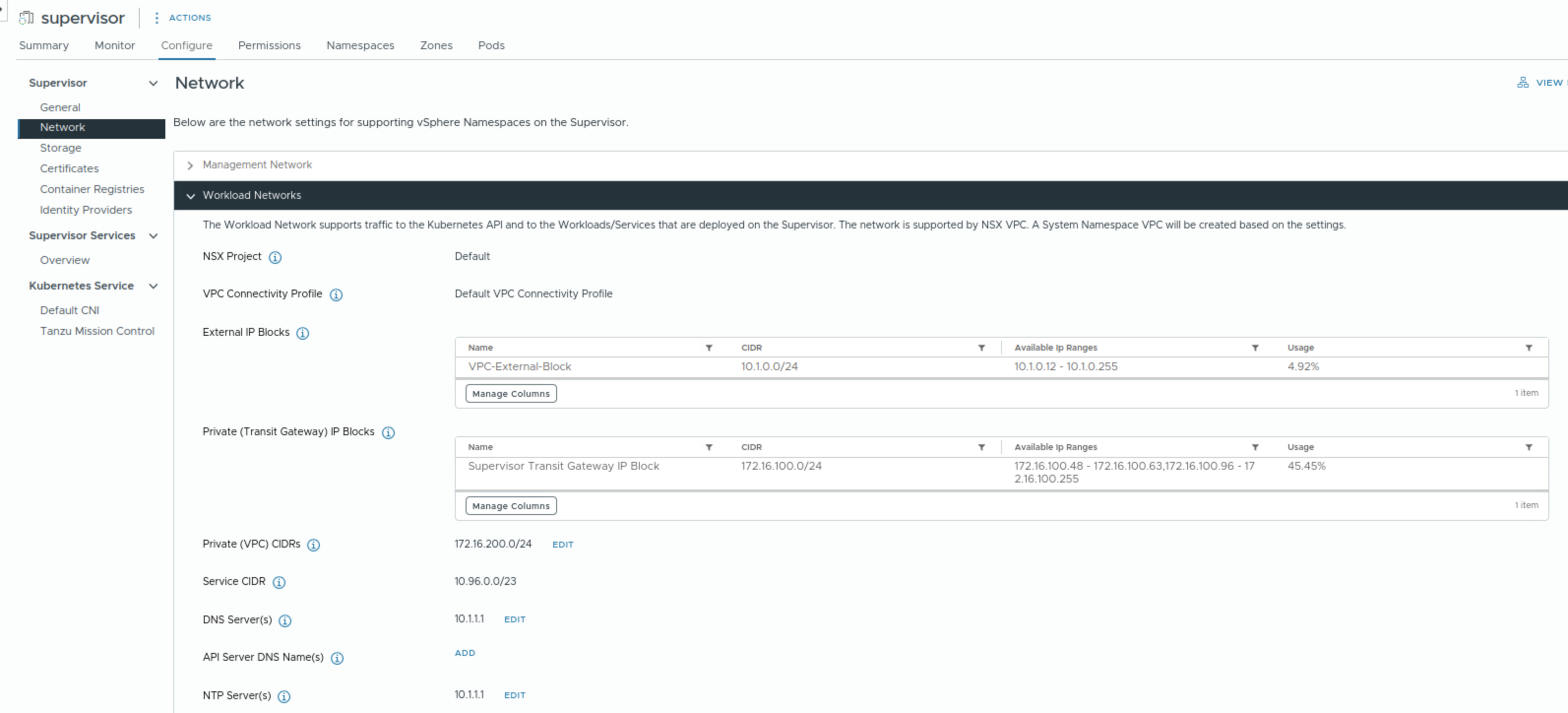
- NSX Project, default NSX project can be used.
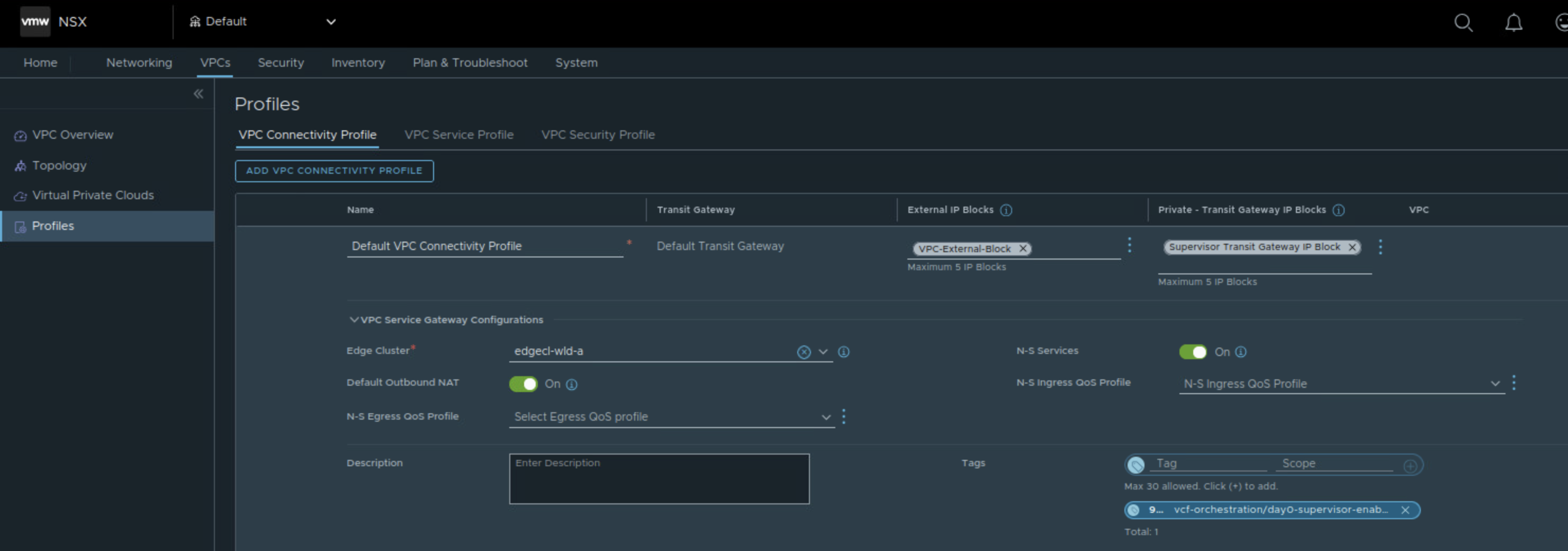
- NSX VPC connectivity profile, default VPC Connectivity profile can be used.
- Private Transit Gateway IP block – Private Transit Gateway subnets get IP addressing from these.
- External IP block for assigning IPs to public subnets, SNAT IPs and IPs for Kubernetes ingresses, load balancer-type services. SNAT IP is used to allow workloads on private VPC subnets to reach external network. One SNAT IP and one kubernetes ingress IP is allocated to each namespace. One load balancer IP for each load balancer type service. The Tier-0 gateway will advertise them to external routers via BGP. Also used for assigning external IPs to specific vNICs requiring direct physical network access.
- Auto SNAT should be enabled.
- Private VPC CIDRs – Private subnets get IP addressing from these.
- Kubernetes services CIDR range: To assign IP addresses to Kubernetes services. You must specify a unique Kubernetes services CIDR range for each Supervisor.
NSX VPC connectivity profile parameters:
Deployment workflow
View workload networks configuration for activated vSphere Supervisor
vSphere Supervisor with NSX VPC – VCF Automation Organization X (NSX Project X)
 Networking & Security